Fedora Installation
dwm-titus is Fedora-only. Fedora Linux with Xorg is required for every supported installation, package, test, and release path.
Dependencies
See Desktop Dependencies for a component-by-component breakdown of the window manager, shell, services, applications, build tools, and the differences between installation profiles and image variants.
Fedora ISO (Recommended for a New Installation)
The current offline images install a complete Fedora 44 x86_64 desktop from a compressed system image. Packages are included, so installation works without an Internet connection or software selection.
| Image | Download |
|---|---|
| Standard | Download standard ISO |
| NVIDIA | Download NVIDIA ISO |
| Checksums | Download SHA256SUMS |
The download URLs always serve the current builds. Download a fresh checksum file with your selected ISO. If a build changes while you have a partial download, start again instead of resuming the older file. The build manifest records the version, size and SHA-256 of each current image.
Use the standard image unless you need the proprietary NVIDIA driver packages.
Both include LightDM, dwm, Quickshell, Brave Origin, Celluloid, mpv, sxiv, Thunar,
Alacritty, Starship, Herdr, fonts, Papirus icons, Gear Lever, and maim with region capture and
clipboard dependencies. Fresh accounts use Brave Origin for web browsing,
Celluloid for its supported audio/video formats, sxiv for its supported image
formats, Thunar for folders, and Alacritty for the terminal. Existing application
preferences are preserved; use Settings > Defaults to change them. Internet
access is needed for later updates and additional software.
Verify the Download
Save your selected ISO and SHA256SUMS in the same directory. On Linux, run:
sha256sum --ignore-missing -c SHA256SUMSYour selected ISO must report OK; do not continue with a mismatch. For a
resumable standard-image download from the command line:
curl --fail --location --continue-at - --remote-name \
  https://downloads.christitus.com/iso/dwm-titus.iso
curl --fail --location --remote-name \
  https://downloads.christitus.com/iso/SHA256SUMS
sha256sum --ignore-missing -c SHA256SUMS
For NVIDIA, use the NVIDIA ISO link from the table with the same checksum file.
Install from USB
- Write the ISO as a disk image to an 8 GB or larger USB drive using a USB image writer. This erases the USB drive; copying the ISO file onto it is not the same as writing the image.
- Boot the USB and use the default media-test/install entry. Qualification used Secure Boot disabled; Secure Boot support is not verified.
- Select your language and keyboard, time zone, installation disk and partition layout. Create your user account and select administrator access.
- Review the proposed disk changes and choose Begin Installation. The compressed image provides the package set; there is no installation-source or software-selection step and no network connection is required.
- Once installation finishes, reboot and remove the USB. Log in through LightDM using the dwm session. The desktop is already installed; you do not need to run the existing-system installer below.
Super is usually the Windows key. Open Thunar with Super+E, open a terminal
with Super+X, take a full
screenshot with Super+P, select a region with Super+Shift+P, or copy a region
to the clipboard with Super+Ctrl+P.
For the current version, checksums, build validation and hardware qualification limits, see the build notes and build manifest. Check those notes before installing, especially for NVIDIA hardware, Secure Boot and firmware combinations that may not have been qualified.
Existing Fedora System: Quick Install
The easiest way is via Linutil:
curl -fsSL https://christitus.com/linux | shIn the TUI, press v to multi-select, then select dwm, bash prompt,
and alacritty. Press Enter to install.
Herdr is optional. To add its checksum-verified helper after the Linutil path, run:
install-herdr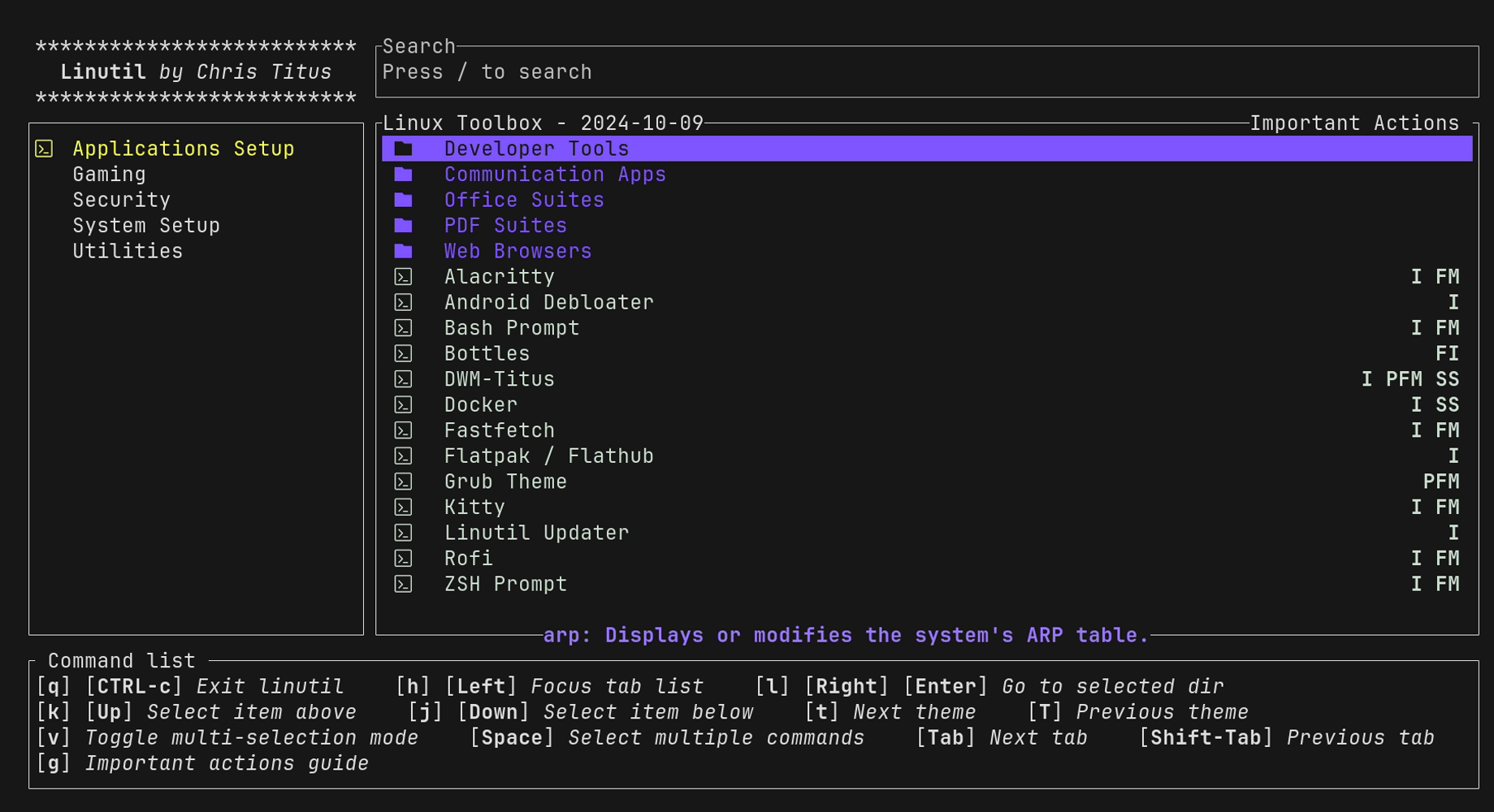
Manual Install
1. Dependencies
The supported dependency path is the installer because it resolves Fedora package names from the shared map:
./install.sh --dry-run --non-interactive --profile core
./install.sh --profile full
Use core for the required build/X11/session packages, Alacritty, and media applications,
recommended for the complete desktop layer, or full for optional extras
such as file-manager integration, keyring login integration, wallpapers, and
display-manager setup. On x86_64 Fedora, full can also install Steam,
Gamescope, GameMode, and MangoHud after repository approval.
The installer separately asks before enabling the christitustech/copr-fedora
COPR for patched Gamescope and RPM Fusion nonfree for Steam. Declining skips the
gaming subset without affecting other full-profile extras.
2. Clone and Build
git clone https://github.com/ChrisTitusTech/dwm-titus.git
cd dwm-titus
cp config.def.h config.h
./scripts/dev-sync-install.sh
For later source-checkout updates, run the same command so the binary,
installed helpers, managed Quickshell configuration, and data copy stay at one
revision. Run ./scripts/dev-sync-install.sh --check after any requested
session restart to verify the active runtime.
Automated Installer
./install.shThe script requires ID=fedora before handling dependency installation, font
copying, display-manager integration, or config placement. Every other
operating-system identity is rejected before changes are made.
Existing user configuration and .xinitrc files are preserved. Upgrades remove
the known legacy dwm-graphical-session.service and
wm-graphical-session.service early-start configuration so XDG applications
start only after the X11 display environment is available; customized user
units are disabled from early startup but otherwise preserved.
System files are installed with sudo, while configuration and data under the
user’s XDG directories are installed as that user.
If a v0.6.0 Fedora image left the default XDG parents owned by root, first verify that none of them is a symbolic link, then repair only those parents and rerun the installer:
xdg_parents=()
for path in "$HOME/.local" "$HOME/.local/share" "$HOME/.config"; do
    test ! -L "$path" || {
        printf 'Refusing symbolic link: %s\n' "$path" >&2
        exit 1
    }
    test -e "$path" || continue
    test -d "$path" || { printf 'Refusing non-directory: %s\n' "$path" >&2; exit 1; }
    xdg_parents+=("$path")
done
((${#xdg_parents[@]} == 0)) || sudo chown "$(id -u):$(id -g)" -- "${xdg_parents[@]}"
./install.sh
This repair is intentionally non-recursive so it does not change unrelated user files.
Every profile and Fedora image defaults to Alacritty without Herdr. With the
explicit --install-herdr option, the repository downloads the official
https://herdr.dev/install.sh into an isolated staging directory and verifies
repository-pinned SHA-256 checksums for both that installer and its resulting
Herdr binary before copying it into ~/.local/bin. A checksum mismatch or
network failure leaves Alacritty usable and reports the Herdr failure. When the
codex or claude command is already available, the helper also runs Herdr’s
matching integration install command so native Codex and Claude Code sessions
can be restored. Integration failures are reported separately from binary
installation failures.
When matching vendor XDG entries exist for Picom, the polkit agent, or Light Locker, the installer copies each entry to the user autostart directory and adds only the dwm session exclusion. Original commands and vendor session guards remain intact, no entry is created when the vendor entry is absent, and existing user entries are preserved.
Installer package profiles are selected with DWM_INSTALL_PROFILE:
core: required build packages, X11/session runtime, Alacritty, Celluloid, mpv, and sxiv. Fresh accounts receive Celluloid audio/video and sxiv image defaults for their advertised formats. Existing MIME preference files are preserved; change these in Settings > Defaults when updating an existing account. Herdr is skipped unless--install-herdris provided.recommended:coreplus the recommended desktop layer such as Quickshell, Picom, Feh, Dex, fonts, theming, screenshot, audio, Bluetooth control and tray tools, brightness tools, Flatpak, the GTK desktop portal, PackageKit, AccountsService, CUPS, and the Fedora printer configuration tool. These system services are prerequisites for the planned Phase 6 Settings update, account-summary, and printer entry points. The profile also adds Flathub for the target user, installs Gear Lever as the default AppImage manager, installs the available Fedora GTK theme packages, and installs Nordic system-wide for the default Nord theme. Source-checkout synchronization does not infer this profile from independently installed programs. Existing installations must rerun the recommended or full installer to add the Phase 6 PackageKit, Python RPM binding, AccountsService, CUPS, and printer-tool packages.full:recommendedplus optional extras such as Thunar with SMB-share browsing, network tray utilities, keyring login integration, wallpapers, and display-manager setup. x86_64 Fedora full installs also include Steam, Gamescope, and 64-bit and 32-bit GameMode and MangoHud support after separate repository approval. The installer enables thechristitustech/copr-fedoraCOPR for Gamescope and RPM Fusion nonfree for Steam, then adds the invoking user to thegamemodegroup; log out and back in before using its privileged tuning helpers.
The default is full to preserve the historical automated installer behavior.
Existing source-checkout installations upgrading into Phase 6 should rerun
./install.sh --profile recommended (or full) to install the new system
management packages; a dry run previews the added packages first. The update
does not remove packages or alter the host SELinux policy.
If maim is unavailable in the enabled Fedora repositories, the installer
skips that add-on instead of failing the desktop install and reports that the
screenshot hotkeys are unavailable.
For a minimal install:
DWM_INSTALL_PROFILE=core ./install.shThe same profile can be selected with a flag:
./install.sh --profile coreInteractive runs print the resolved package plan before prompting. For CI, packaging checks, or scripted validation, use the non-interactive flags:
./install.sh --dry-run --non-interactive --profile core
./install.sh --non-interactive --yes --profile recommended
./install.sh --non-interactive --yes --profile full --enable-fedora-gaming-repos
Without --enable-fedora-gaming-repos, unattended Fedora full installs skip
Steam, Gamescope, GameMode, and MangoHud rather than changing repository trust.
Herdr is skipped for every profile unless --install-herdr or
DWM_INSTALL_HERDR=true is provided. Its published Linux binaries support
x86_64 and aarch64. Installation alone does not change the terminal default;
set DWM_HERDR=1 and run dwm-terminal to enter the optional workspace.
Herdr can also be installed or repaired separately:
install-herdr
install-herdr --force
Upgrades preserve an existing hotkeys.toml. If an earlier installer seeded
its terminal variable to dwm-terminal, set it to alacritty to adopt the
current direct-terminal default. The installer does not overwrite that
user-owned choice.
Source Updates and Recovery
Settings > System now offers Desktop updates above Fedora updates. It checks
official main, detects stale managed files, and installs a confirmed update
with progress and recovery records. Existing installations use the source
procedure below once to install that support. See
Desktop updates and recovery for the update
contract, restart behavior, and interrupted-operation recovery.
Before a source update, save the current checkout and user configuration. Run this from the checkout as your regular user in Bash, with desktop settings closed so they cannot change during the backup:
repo_dir=$(pwd -P)
backup_dir=$(mktemp -d "$HOME/dwm-titus-backup.XXXXXX") || exit 1
chmod 700 "$backup_dir" || exit 1
tar -C "$repo_dir" -cpf "$backup_dir/source.tar" . || exit 1
printf 'export XDG_CONFIG_HOME=%q\nexport XDG_DATA_HOME=%q\n' \
    "${XDG_CONFIG_HOME:-$HOME/.config}" "${XDG_DATA_HOME:-$HOME/.local/share}" \
    >"$backup_dir/xdg.env"
python3 - "$repo_dir/config.h" "${XDG_CONFIG_HOME:-$HOME/.config}" \
    "$HOME/.xinitrc" "${XDG_DATA_HOME:-$HOME/.local/share}/applications" \
    >"$backup_dir/user-paths.nul" <<'PYTHON' || exit 1
import os
import sys

pending = [os.path.abspath(p) for p in sys.argv[1:] if os.path.lexists(p)]
seen = set()
while pending:
    original = pending.pop()
    # Canonicalize parents, retaining a final symlink as its own archive entry.
    path = os.path.join(os.path.realpath(os.path.dirname(original)), os.path.basename(original))
    if path in seen:
        continue
    seen.add(path)
    if os.path.islink(path):
        target = os.path.realpath(path)
        if not os.path.exists(target) or not os.access(target, os.W_OK):
            sys.exit("Back up this missing or read-only link target separately: " + path)
        pending.append(target)
    elif os.path.isdir(path):
        pending.extend(entry.path for entry in os.scandir(path))
for path in sorted(seen):
    sys.stdout.buffer.write(os.fsencode(path.lstrip("/")) + b"\0")
PYTHON
tar -C / --null --no-recursion -cpf "$backup_dir/user.tar" \
    -T "$backup_dir/user-paths.nul" || exit 1
printf 'Recovery backup: %s\n' "$backup_dir"
The source archive includes your config.h and Git state. Keep the backup
private: application configuration can contain credentials. This backs up
source and configuration, not Fedora packages or all personal data. The user
archive records the effective XDG paths, symlink layout, and the contents of
referenced writable targets, including dotfiles outside the checkout. A missing
or read-only link target stops the recipe; resolve it or back it up separately
before updating. Keep the XDG parent-directory layout unchanged during recovery.
For a clean tracked checkout, update and synchronize the installed files:
git status --short
git pull --ff-only || exit 1
./install.sh --non-interactive --yes --profile recommended || exit 1
./scripts/dev-sync-install.sh
Resolve local source changes before pulling. The installer preserves existing
user TOML files, config.h, .xinitrc, and application configuration. It
replaces the managed Quickshell directory to match the installed helpers.
Log out and select dwm again, then run:
./scripts/dev-sync-install.sh --check
dwm-diagnostics
If an update is interrupted, retain its log and rerun the same installer and synchronization commands after fixing the reported cause. Do not interrupt an active RPM transaction as a recovery technique. If the desktop is unusable, switch to a TTY with Ctrl+Alt+F3 and log in as the same user.
To restore a backup, set backup_dir to the exact path printed above. Close the
desktop session first. The following restores the saved configuration and link targets over their
recorded paths and builds the saved source in a separate directory, leaving the
failed checkout available for inspection:
test -f "$backup_dir/source.tar" && test -f "$backup_dir/user.tar" || exit 1
restore_dir=$(mktemp -d "$HOME/dwm-titus-restored.XXXXXX") || exit 1
tar -C "$restore_dir" -xpf "$backup_dir/source.tar" || exit 1
tar -C / --keep-directory-symlink -xpf "$backup_dir/user.tar" || exit 1
source "$backup_dir/xdg.env"
cd "$restore_dir" || exit 1
./install.sh --non-interactive --yes --profile recommended || exit 1
./scripts/dev-sync-install.sh
Log in again and run ./scripts/dev-sync-install.sh --check from the restored
checkout. Keep both directories until runtime verification passes. This
procedure does not downgrade RPMs, remove files created after the backup, or
undo external service and firmware changes. Package update recovery is a
separate operation in Settings; follow its recorded transaction guidance.
Starting dwm
Display manager (SDDM, GDM, LightDM): log out and select dwm from the session list.
When the interactive installer runs inside an active X11 session, it offers
the dwm-display-setup wizard after installation. The wizard previews the
chosen resolution and multi-monitor layout, then installs a backed-up Xorg
fragment. Installations run from a TTY or in non-interactive mode defer this
step; after the first X11 login, run:
dwm-display-setupThe installed Settings display provider is machine-oriented. Its actions are:
dwm-settings-display discover
dwm-settings-display watch
dwm-settings-display save NAME SPEC...
dwm-settings-display preview TOKEN SECONDS SPEC...
dwm-settings-display preview-profile TOKEN SECONDS NAME
dwm-settings-display keep TOKEN [NAME]
dwm-settings-display revert TOKEN
dwm-settings-display preview-status [TOKEN]
dwm-settings-display install-profile NAME
dwm-settings-display rollback-system
Discovery and live previews require xrandr, and the hotplug watch requires
udevadm. Persistent install and rollback additionally require pkexec plus
the root-owned helper installed at ${PREFIX}/libexec/dwm-titus/. Profiles are
stored under
${XDG_CONFIG_HOME:-$HOME/.config}/dwm-titus/display-profiles/. No move is
needed for profiles created by dwm-display-profile, which uses the same
directory. If DWM_DISPLAY_PROFILE_DIR previously pointed elsewhere, either
keep that environment override or move those .conf files into the default
directory before using Settings.
The input provider exposes the corresponding session actions:
dwm-settings-input discover
dwm-settings-input watch
dwm-settings-input watch-apply
dwm-settings-input apply-saved
dwm-settings-input preview TOKEN SECONDS DEVICE SETTING VALUE
dwm-settings-input keep TOKEN
dwm-settings-input revert TOKEN
dwm-settings-input preview-status [TOKEN]
dwm-settings-input reset DEVICE SETTING
Input discovery and per-device actions require xinput; keyboard layout and
modifier operations also require setxkbmap; session-wide XKB accessibility
controls require xkbset; stable hardware identity and hotplug watching use
udevadm, and the session watcher uses flock from util-linux to prevent
duplicate replay workers. Kept values default to
${XDG_CONFIG_HOME:-$HOME/.config}/dwm-titus/input-settings.conf. Set
DWM_INPUT_SETTINGS_FILE to use a different file. The normal session startup
invokes apply-saved idempotently and runs watch-apply to debounce input
hotplug events before replaying saved values for returning devices.
startx:
startxThe provided .xinitrc disables screen blanking, starts the configured Quickshell panel, and runs dwm.
Minimal Session Profile
The minimal supported profile is useful for lean Fedora systems, recovery sessions, and minimal Fedora qualification. It keeps only:
- an X11 server and either a display-manager session or
startx - D-Bus session support
dwm- Alacritty as the default terminal, with
dwm-terminalavailable to delegated tools that require fallback selection - required X11 helpers used by core startup and display commands, such as
xrandr,xset, andxsetroot
Quickshell, Picom, Feh, Dex, a polkit agent, screenshot tools, wallpapers, tray
utilities, and audio or brightness helpers are optional in this profile.
Missing optional components should appear as degraded features in
dwm-diagnostics, not as session-fatal failures.
For startx, a minimal .xinitrc can be:
#!/bin/sh
xset s off
xset -dpms
xsetroot -cursor_name left_ptr
exec dbus-run-session dwm
If the login path already creates a user D-Bus session, use exec dwm
instead of wrapping it with dbus-run-session.
After installation, verify the profile with:
dwm-diagnostics
dwm-terminal --print-command
dwm-diagnostics must report zero required failures before treating the
minimal profile as ready. Optional degraded features can remain unresolved.
The default binding opens Alacritty directly. A plain dwm-terminal also opens
the selected emulator directly unless DWM_HERDR=1 explicitly enables Herdr.
Commands such as dwm-terminal -e sh -c 'command' always bypass Herdr.
Flatpak prerequisites
Recommended and full installs install the Fedora Flatpak package before configuring the official Flathub remote for the target user. Gear Lever setup verifies the remote matching an existing app, or prepares the user remote before a new installation. Preinstalled system apps use the existing system remote so fresh image account setup remains offline. Factory images perform the same checks in system scope before installing Flatpak apps. Repeated setup preserves existing apps and remotes; an unreadable, disabled, or conflicting Flathub remote stops dependent installs with an error.
After resolving a setup failure, retry scripts/install-gearlever from the
source checkout. To prepare the user remote independently, run
scripts/dwm-flatpak-setup --user. If Flatpak is missing, rerun
./install.sh --profile recommended first.
Default image storage layout
Both Fedora image variants default to regular partitions with /home as an
ordinary directory on the root (/) filesystem, sharing its free space. The XFS root partition grows to use the selected
drive’s available capacity after boot partitions, without the Fedora Server
automatic-layout size cap. Anaconda
creates the boot partitions required by BIOS or UEFI. Select the intended
installation drive in Anaconda and review any destructive storage changes before
confirming. Fedora Anaconda may initially select every attached disk when
loading Kickstart: deselect all drives you do not intend to install onto. The
public profiles do not authorize disk erasure or bypass storage review. Custom
partitioning remains available for a different layout.